Weave Router vs OpenRouter
Choose Weave Router to manage the cost of a complete coding session. It selects models for each action, accounts for cache rebuilds and escalates stalled work to a frontier model. Supported Claude and Codex subscriptions can supply capacity before API spend. Compare that inspectable coding policy with OpenRouter’s managed model access and automatic routing.
[3][4][1]Sources last reviewed
Choose Weave for coding-session economics you can inspect.
Weave Router is the stronger starting point when you want task-aware model selection, cache-aware switching, escalation and existing subscription routing in one coding workflow. OpenRouter is a strong choice for broad model access and provider controls, and its Auto Router performs real automatic model selection.
[3][11][12]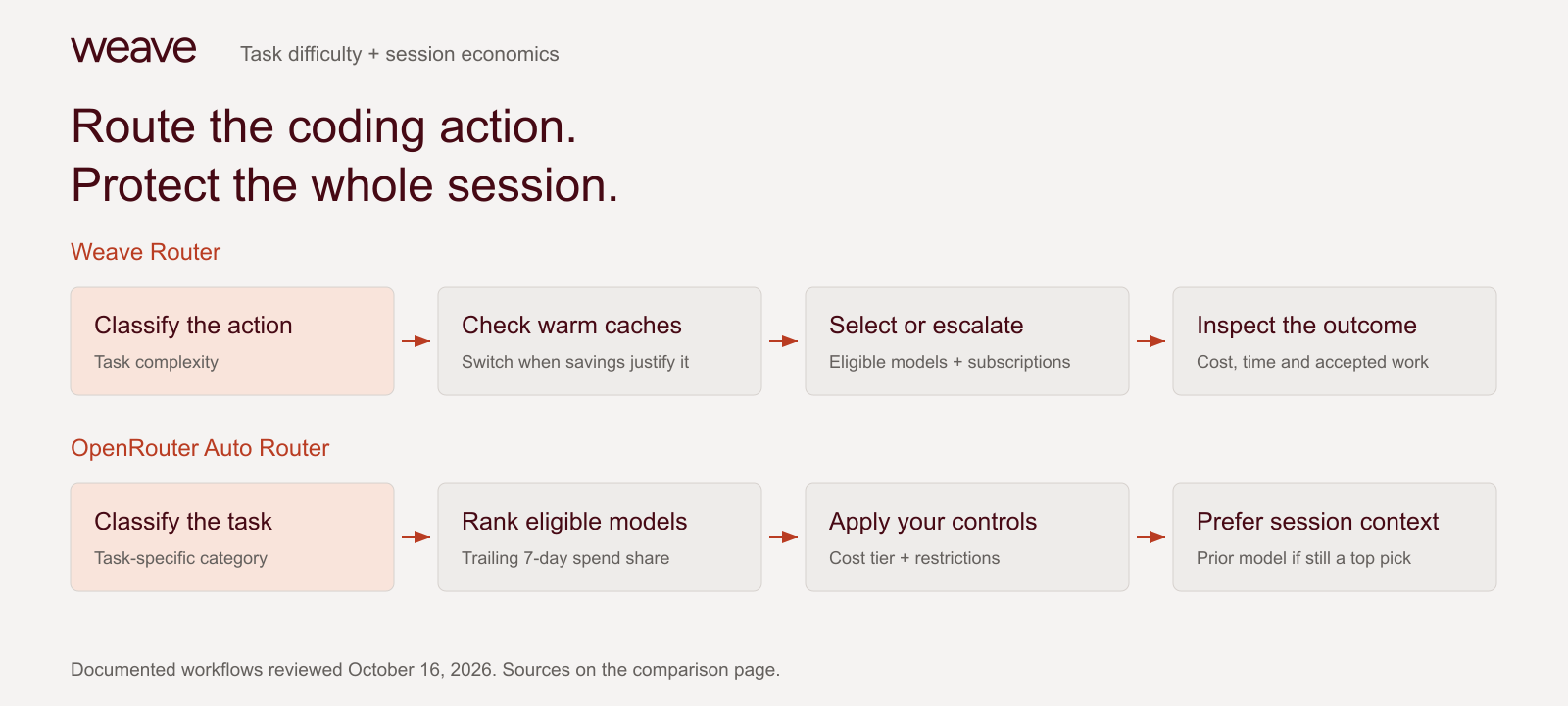
The evidence
Published coding results. Complete tradeoffs.
In Weave’s published Codex experiments, Router solved a larger share of tasks than the OpenRouter Auto Beta arm on both suites. On Terminal-Bench it also used less cost and time per trial. On SWE-Atlas, OpenRouter cost less and finished faster. These are historical observations on a specific harness and policy.
Terminal-Bench 4.0: Tasks solved in two attempts
% · higher is better. Bars start at zero.
- Weave Router
- 62.1%
- OpenRouter Auto Beta
- 25.0%
Terminal-Bench 4.0: Cost per trial
USD · lower is better. Bars start at zero.
- Weave Router
- $5.22
- OpenRouter Auto Beta
- $5.52
Terminal-Bench 4.0: Mean time per trial
minutes · lower is better. Bars start at zero.
- Weave Router
- 20.5 min
- OpenRouter Auto Beta
- 36.0 min
SWE-Atlas Codebase QnA: Tasks solved in two attempts
% · higher is better. Bars start at zero.
- Weave Router
- 62.1%
- OpenRouter Auto Beta
- 54.0%
SWE-Atlas Codebase QnA: Cost per trial
USD · lower is better. Bars start at zero.
- Weave Router
- $2.31
- OpenRouter Auto Beta
- $1.49
SWE-Atlas Codebase QnA: Mean time per trial
minutes · lower is better. Bars start at zero.
- Weave Router
- 6.8 min
- OpenRouter Auto Beta
- 5.7 min
Pass@2 counts a task if either of two attempts passes. Terminal-Bench: 66 tasks; SWE-Atlas Codebase QnA: 124. OpenRouter ran separately within three days on the same tasks and graders, at xhigh reasoning. This is contextual evidence, not a paired win, current Auto Router evaluation, significance claim or leaderboard submission. Costs are per trial: Weave uses router-billed catalog rates; OpenRouter uses OpenRouter-billed cost. Subscription capacity and current purchase fees are not measured by these charts.
At a glance
Weave Router and OpenRouter, compared
Scroll horizontally to see both products on smaller screens.
| Compare | Weave Router | OpenRouter |
|---|---|---|
| Routing decision[3][1] | Task complexity with cache-aware switching and escalation for coding work, so you can evaluate model choice against completed tasks rather than isolated prompts. | Task classification and aggregate spend-share rankings, filtered by cost tier, capability and account restrictions. |
| Multi-turn behavior[3][1] | Considers cache rebuild costs before switching; supports session context and escalation. Evaluate the full session, including context restored after a model change. | Session stickiness, prior-model preference and provider sticky routing. |
| Existing subscriptions[3][2] | Documents routing across eligible Claude and Codex subscriptions, so teams can compare existing plan capacity with API usage before adding another budget. | Documents prepaid credits and BYOK provider billing. Those meters differ from routing across flat-rate coding subscriptions. |
| Coding evidence[11][12][1] | Published Codex-harness results on Terminal-Bench 4.0 and SWE-Atlas, with a reproduction harness teams can use to evaluate completed work on a consistent task set. | OpenRouter Auto Beta appears in those historical runs. Current Auto Router behavior is documented separately. |
| API and deployment[4][2] | Open-source Router with self-hosted and hosted options and documented coding-harness installation, letting platform teams inspect the policy and choose a deployment model. | Managed catalog and provider controls, including policy-based routing and enterprise options. |
| Pricing[5][6][2] | Code Max is $10/month with $50 in monthly credits for open-source models. Code Boost is $100/month with $200 in monthly credits and access to OpenAI, Anthropic and open-source models. Router subscriptions are separate from platform plans; enterprise deployment is custom. Confirm the applicable quota, provider charges and deployment terms. | Standard adds 5.5% when buying credits; Business adds 8%. Inference uses provider list prices, and Auto Router adds no separate routing fee. BYOK includes $25,000 of list-price inference per month without an OpenRouter fee on Standard and Business, then a 5% fee above it. |
| Beyond the routing bill[10][8][2] | Separate Weave platform products connect AI spend with explained code output, quality and delivery. | Activity logs, exports, usage and spend controls address gateway operations. Compare the engineering analytics you require separately. |
Sources and comparison method
Published by Weave. Vendor documentation and prices reviewed October 17, 2026. Recommendations reflect workflow fit. Product tiers and integration coverage vary. Performance charts retain the scope and limitations of the cited experiments.
- OpenRouter Auto Router: task classification, restrictions and session stickiness
- OpenRouter pricing: purchase fees, BYOK and Auto Router charges
- Weave Router: workflow, cache decisions and escalation
- Weave Router: public source and installation
- Code Boost: $100/month and $200 monthly credits
- Weave platform and separately billed Router plans
- Silk 1: explained code output and calibration
- Token Intelligence: AI attribution and cost sources
- Engineering Intelligence: quality, reviews and delivery
- Weave AI ROI: units, coverage and limits
- Published Router 2.0 coding benchmark results and run notes
- Reproducible Codex benchmark harness
What is Weave Router?
Weave Router routes individual coding-agent actions using task complexity, cache economics, escalation and eligible provider subscriptions. Its public installer supports Claude Code, Codex, OpenCode and Pi; the public repository also documents Cursor in early beta. Hosted plans and self-hosted deployment are separate options.
[3][4]What is OpenRouter?
OpenRouter is a unified model and provider platform. Auto Router classifies prompts into task types, ranks eligible models using aggregate community spend over a trailing seven-day window and applies cost tiers, restrictions and fallbacks. It can prefer the previous model on later turns when that model remains a top candidate.
[1][2]The key difference
Optimize the coding session, from model choice to finished work.
OpenRouter starts with a broad model market
Its current Auto Router uses task-specific market spend rankings, with model, provider and cost controls. It also documents session stickiness. This is useful infrastructure for applications and agent stacks that want OpenRouter’s catalog and operating controls.
Weave starts with the engineering task
A cheap response that causes retries or loses a warm cache can make a session more expensive. Weave’s documented workflow considers task difficulty, cache economics, escalation and subscription quota together. The benefit is a routing policy built around how coding agents work.
The purchase decision is about the complete session. Compare accepted code, quality, cache behavior and total cost under the actual policy you will deploy.
Why teams choose Weave
A coding workflow you can inspect and reproduce.
Test completion, cost and time
Weave publishes coding task results with costs, times, task counts and a reproducible Codex harness. Use them to design your own pilot and judge routing by completed work. The historical Auto Beta comparison is not a test of every current OpenRouter configuration.
[11][12][1]Put the whole coding session behind the decision
Account for context as tasks get harder
Weave Router
Weave weighs cache rebuilding before switching and can escalate harder work. Evaluate the cost of finishing the task, including the context a model change must rebuild.
OpenRouter
Set the Auto Router cost tier and restrictions, then inspect its selected model and session stickiness as the task changes.
Use the coding capacity you already own
Weave Router
Keep your coding harness while Weave considers enabled providers and eligible Claude or Codex subscriptions. Put existing subscription capacity into the routing decision alongside API usage.
OpenRouter
Use a single managed API with provider preferences, fallbacks and catalog access.
Explain the engineering result behind the bill
Weave Router
The separate Weave intelligence platform connects AI spend with explained code output, quality and delivery. Give a renewal discussion evidence about the work produced as well as the requests served.
OpenRouter
Export activity and usage, then join the engineering outcome data your reporting needs.
When OpenRouter is the better fit
Choose OpenRouter when a broad managed catalog, provider preferences, policy-based controls and pay-as-you-go access are the central requirements. Its current Auto Router supports coding task types and session stickiness. Evaluate that current policy directly; the historical benchmark is not a test of every current configuration. Choose Weave when evaluating the coding policy, subscription capacity and complete session cost is your priority.
[1][2][3][4]How to evaluate switching from OpenRouter
Keep a working baseline
Save your current endpoint and client configuration. Pick representative tasks with tests, review criteria and a known working pinned model.
Connect one coding harness
Run npx @weave-os/router and choose your supported harness. Select the plan, enabled models and credentials appropriate to that deployment. Start a fresh session after configuration.
Measure completed work
Compare accepted changes, full-session cost, cache reads and writes, retries and elapsed time. Include any subscription and platform fees; a lower token price is not enough.
Expand after review
Roll out to a small group after checking streaming, tool use and model-specific behavior. Keep a direct route for rollback and use model pinning for work that requires it.